
AutoFigure: 편집 가능한 과학 일러스트레이션 생성
Auto Figure는 논문의 방법론 텍스트를 완전히 편집 가능한 SVG 과학 일러스트레이션으로 변환합니다 — 자유롭게 수정할 수 있는 출판 품질의 학술 그림.
LLM 생성, SAM3 세그멘테이션, 벡터화를 결합하여 Auto Figure는 고품질 방법론 다이어그램을 생성하고, 참조 이미지에서 스타일 전송을 지원하며, 브라우저 내 SVG 편집기를 내장하고 있습니다.
지금 AutoFigure를 체험하세요
Auto Figure의 자동 논문 그림 생성을 직접 체험하세요. 방법론 텍스트를 붙여넣고, 선택적으로 참조 이미지를 업로드하여 스타일 전송을 수행하면 AutoFigure가 출판 품질의 편집 가능한 SVG 일러스트레이션을 생성합니다.
팁: 간결하고 구조화된 방법론 텍스트가 더 깔끔한 템플릿을 생성합니다
팁: 좋아하는 논문의 그림을 업로드하여 시각적 스타일을 전송할 수 있습니다
생성된 이미지 없음
AutoFigure 갤러리
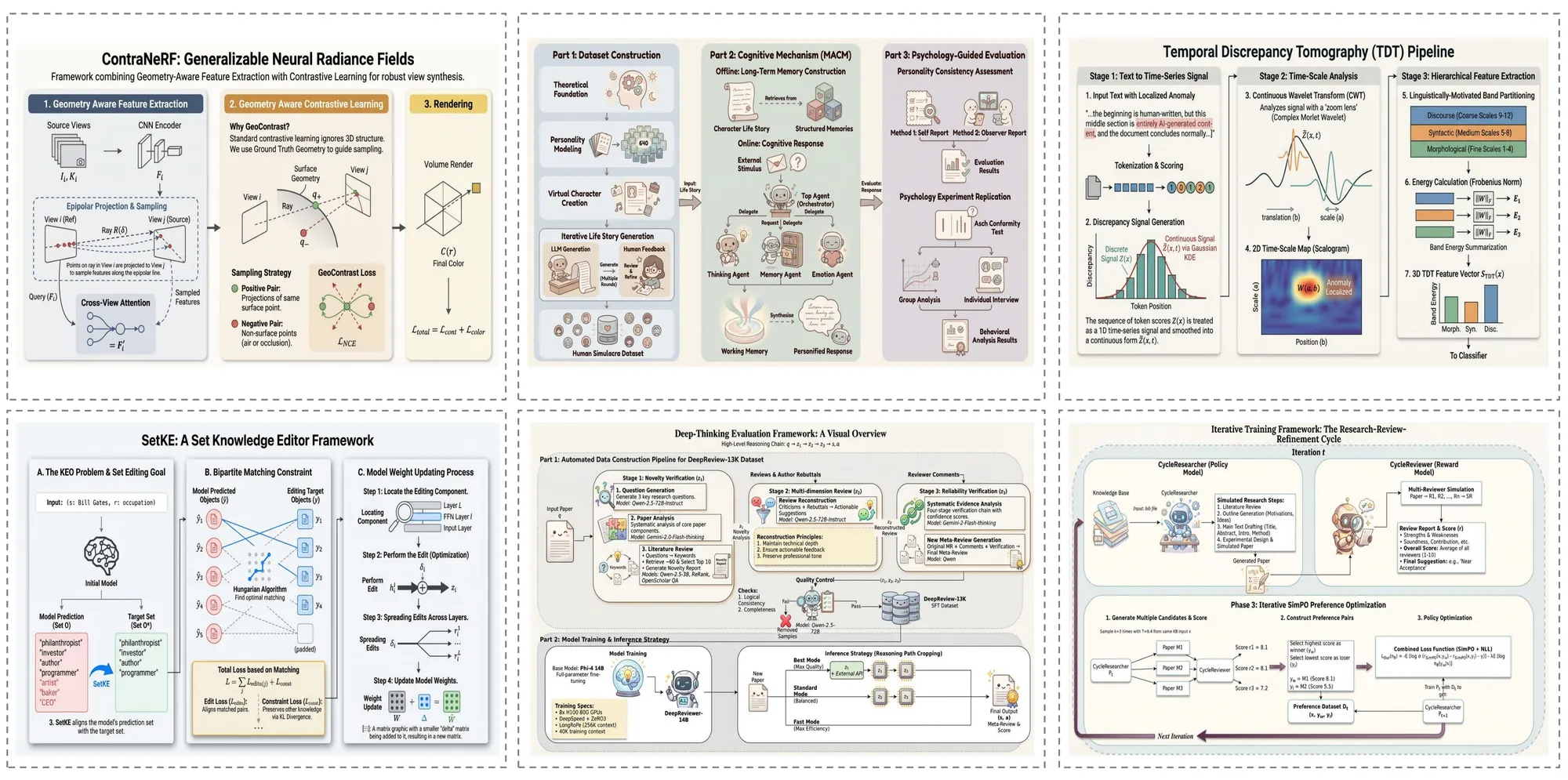
Auto Figure가 다양한 분야에서 생성한 그림 예시입니다. 다양한 복잡도의 과학 일러스트레이션을 처리하는 다재다능함을 확인하세요.
논문 케이스
Auto Figure는 연구 논문 텍스트에서 출판 품질의 방법론 다이어그램을 직접 생성합니다. 복잡한 모델 아키텍처, 다단계 파이프라인, 인코더-디코더 프레임워크를 정확한 도형, 커넥터, 레이블이 포함된 완전히 편집 가능한 SVG 일러스트레이션으로 렌더링합니다.
서베이 케이스
서베이 논문의 경우, Auto Figure는 여러 방법 간의 분류 체계, 관계 및 비교를 포착하는 포괄적인 개요 다이어그램을 생성합니다. 생성된 그림은 명확한 시각적 계층 구조와 일관된 스타일링으로 연구 분야의 전체 그림을 빠르게 파악하는 데 도움을 줍니다.
블로그 케이스
Auto Figure는 비공식적인 기술 글도 처리합니다. 머신러닝 개념을 설명하는 블로그 글부터 기술 튜토리얼까지, 복잡한 아이디어를 더 넓은 독자층이 이해할 수 있도록 명확하고 시각적으로 매력적인 다이어그램을 생성합니다.
교과서 케이스
교육 콘텐츠의 경우, Auto Figure는 기초 개념을 명확하게 전달하는 교과서 수준의 일러스트레이션을 생성합니다. 신경망 아키텍처, 데이터 흐름 다이어그램, 생물학적 프로세스 등 강의 슬라이드, 교재, 교과서 챕터에 적합한 그림을 생성합니다.
자주 묻는 질문
AutoFigure와 작동 방식에 대한 일반적인 질문입니다.
AutoFigure로 시작하기
논문 텍스트를 편집 가능한 SVG 과학 일러스트레이션으로 변환하세요. 위의 Auto Figure 생성기를 사용하거나 ICLR 2026 논문에서 자세한 내용을 확인하세요.
Auto Figure의 핵심 혁신
AutoFigure-Edit는 ICLR 2026에 발표된 과학 일러스트레이션 자동 생성 분야의 획기적인 혁신을 도입합니다.
시스템 아키텍처: 5단계 파이프라인
Auto Figure는 5단계 파이프라인을 통해 과학 텍스트를 편집 가능한 SVG 일러스트레이션으로 변환합니다.
Stage 1: Raster Generation
A vision-language model (Gemini 3.1 Flash) reads your method text and optional reference image, then generates an initial raster draft (figure.png). The LLM understands scientific figure conventions and translates textual methodology into a visual composition.
Stage 2: SAM3 Segmentation
Segment Anything Model 3 (SAM3) detects and segments distinct components — icons, text regions, connectors, shapes — using structured prompts like 'icon, person, robot, animal'. Outputs bounding boxes with confidence scores and a segmentation map (samed.png).
Stage 3: SVG Templating
Using the original figure, segmentation mask, and box metadata as multimodal inputs, the LLM (Gemini 3.1 Pro) generates a placeholder-style SVG whose boxes align with labeled regions. RMBG-2.0 removes backgrounds from cropped icons to create transparent assets.
Stage 4: Final Assembly
The system aligns coordinate systems between the SVG template and original figure, then replaces placeholders with transparent icons extracted from segmentation. This produces the assembled SVG (final.svg) with all components as individually editable vector elements.
Stage 5: Iterative Refinement
An optional optimization stage performs iterative SVG refinement — path optimization, stroke recognition, and layout fine-tuning. Users can also refine the output in Auto Figure's built-in svg-edit canvas with drag-and-drop composition, completing the text-to-editable-SVG workflow.
AutoFigure 공유하기